BPMN
Content may include inaccuracies, outdated information, or technical errors. Users are advised to cross-check critical information before implementation.
BPMN 2.0 is the OMG standard for business process models. A diagram shows more than the happy path: which department does the work, on what condition the process branches, how it can end, and what happens when a deadline passes or an answer never arrives. The standard fixes the notation, so the same diagram reads the same way to an analyst, to a developer and to another BPMN tool.
Create the model
Create the model Order Handling of the type BPMN 2.0 and open its diagram.
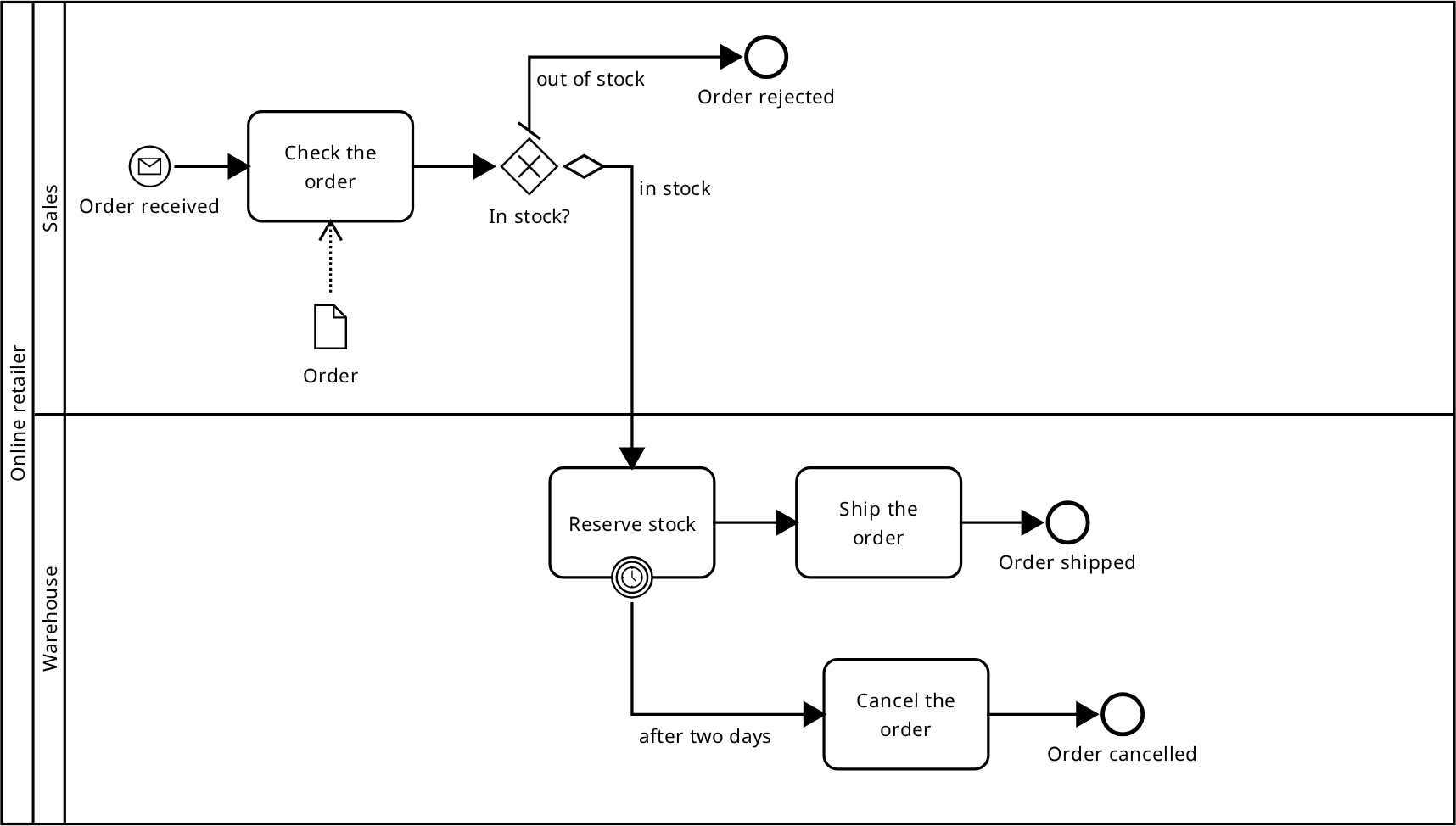
The path of an order
- Create a
Start EventOrder receivedwith the message trigger: what starts the process is neither a schedule nor an operator, but an order arriving from outside. - Create a
TaskCheck the orderand draw aSequence Flowfrom the event to the task. - Create an
Exclusive GatewayIn stock?and draw a flow from the task to it. An exclusive gateway takes exactly one of its branches. - Draw the branch
out of stockto anEnd EventOrder rejectedand make it the default flow of the gateway. - Draw the branch
in stockto aTaskReserve stockand give it the conditionstock available. - Continue from
Reserve stockto aTaskShip the orderand to anEnd EventOrder shipped.
The default flow is taken when no condition holds, so an order cannot get stuck at the gateway. If every branch is conditional, an execution in which none of them holds ends in an error; the editor warns about that.
The process has three end events, one per outcome: Order rejected,
Order shipped and Order cancelled. A single "the end" event would not tell
them apart.
Lanes
Sales check the order, the warehouse reserves and ships it. Place a Pool
Online retailer and split it into the lanes Sales and Warehouse. Move
Reserve stock and Ship the order into the warehouse lane: a node belongs to
the lane it sits in.
Lanes divide the work inside one organisation, pools divide it between several. A customer, a payment service or a carrier needs a pool of its own. Pools are connected by a message flow: a sequence flow does not cross a pool boundary.
When the warehouse is late
What happens when the warehouse misses the deadline is described on the diagram
too. Put a boundary event with the timer trigger on Reserve stock, draw a flow
from it to a Task Cancel the order and on to an End Event
Order cancelled.
A boundary event is either interrupting or non-interrupting. An interrupting one stops the activity: the reservation ends and the order is cancelled. A non-interrupting one leaves the activity running and starts the branch in parallel - that is how a reminder or an escalation is described.
Data
Place a Data Object Order and draw a data association from it to
Check the order - the check reads the order. An association the other way
round, from the task to the object, means the task fills the order in.
A Data Object describes what lives inside a single process instance:
the order itself, an application, a draft letter. A Data Store
describes what outlives the process: a product catalogue, a customer database,
an archive of shipments.
Change type
The type of an element can be changed in two ways: select the node and pick the new type in the Change type section of its palette, or in the Type field of the properties form. A plain task becomes a user, service, send, receive, manual, script or business rule task; an exclusive gateway becomes an inclusive, parallel, event-based or complex one.
The name, the position and the connected flows are kept, so nothing has to be redrawn. The list holds close types only: a task cannot be made into a gateway or an event.
References in the properties form can be followed: from a flow to its source or
its target, from a boundary event to the activity it is attached to, from a
Call Activity to the process it calls. The element is selected on a diagram
that shows it.
The model tree
A diagram is opened by clicking the process or the collaboration drawn on it.
Messages, signals, errors and resources live in a Declarations folder rather
than in a process: the same Order message can be caught by the start event in
sales and sent by a task in the warehouse, so it is described once for the whole
model and elements refer to it.
Validation
The model is validated as you edit. Take the default flow away from the
In stock? gateway, leaving both branches conditional, and a finding appears:
"All outgoing flows of the diverging gateway are conditional, but no default
flow is set: an execution in which no condition holds raises an exception".
Next to it is the fix "Set a default sequence flow". It shows what will change and is applied once you confirm.
Found in the same way are a node no start event can reach, a sequence flow drawn from one pool into another, a boundary event that is not attached to an activity, and an element the process starts at without a start event. Every finding names the clause of OMG BPMN 2.0 it rests on.
Exchange with other tools
The model is stored in the same .bpmn that Camunda, bpmn.io and process
engines work with. Upload model opens such a file, Download with the
format BPMN saves the model back into one.
The layout survives the exchange: the size and the position of every shape and the bends of every line come back as they were, so the diagram does not have to be arranged again. A file saved without coordinates opens too - the editor arranges a diagram for it.