The expression console
Content may include inaccuracies, outdated information, or technical errors. Users are advised to cross-check critical information before implementation.
An expression answers a question about a model: does this element have a name, which processes does this component realize. Two of the five languages also change the model.
The console runs expressions on the selected object and saves nothing.
Expression mode
- Open the Assistant panel.
- Open the language switch under the input field. The first entry is Chat; below it are Acceleo Query Language (AQL), Object Constraint Language (OCL), Epsilon Object Language (EOL), Common Expression Language (CEL) and SPARQL.
- Pick AQL.
The input field highlights the syntax and the send button becomes a run button. The choice of language is kept for the next query.
A query
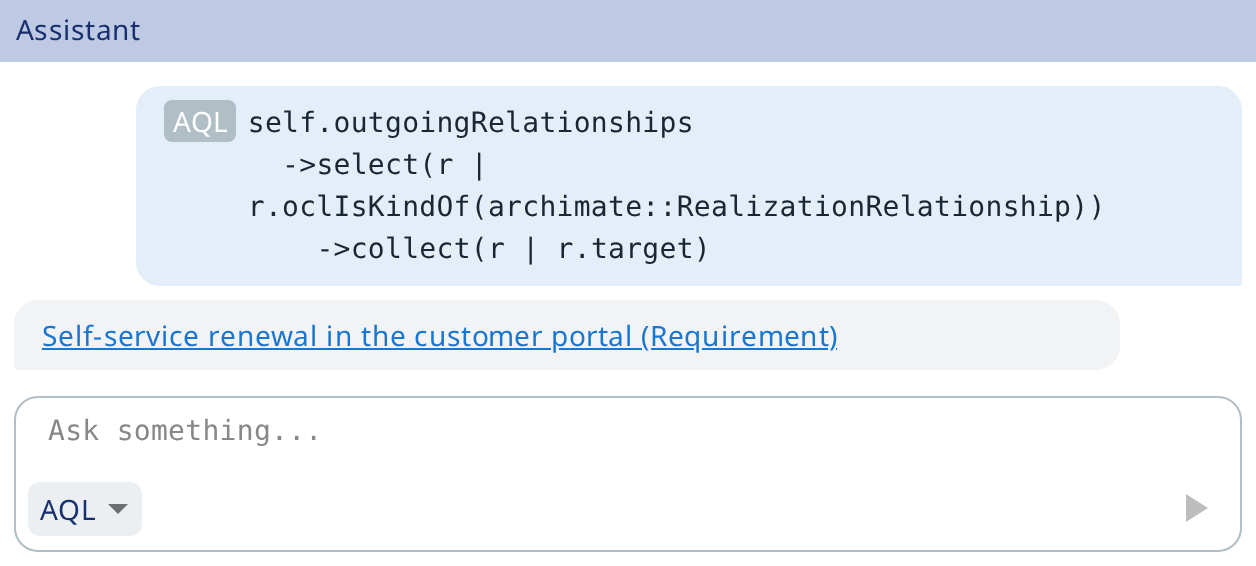
Select an ArchiMate application component in the model explorer and run:
self.outgoingRelationships
  ->select(r | r.oclIsKindOf(archimate::RealizationRelationship))
  ->collect(r | r.target)
self is the object selected in the model explorer at the moment you run the
query, or the root of the current model when nothing is selected. Every
expression has it, whatever the language; in SPARQL it is called ?self.
The answer streams into the conversation, one element per line. A model object
appears as a label with its type - Label (BusinessProcess) - and it is a link:
click it and the object is revealed and selected.
| Key | What it does |
|---|---|
| Enter | Run the query, or accept the selected suggestion |
| Shift+Enter | Insert a line break |
| Up, Down | Recall the previous or next query |
Completion is available in AQL, OCL and SPARQL. Errors are underlined as you type and the first one is written out under the field; while the query holds an error, the run button is disabled.
Choosing a language
| Language | What it is written for | Reads | Changes | Completion | Checked before running |
|---|---|---|---|---|---|
| AQL | Navigating the model, expression fields of a metamodel | Yes | No | Yes | Yes, statically typed |
| OCL | Invariants in validation rules | Yes | No | Yes | Yes, statically typed |
| EOL | Quick fixes and other changes to a model | Yes | Yes | No | Syntax |
| CEL | Compact checks with C-like operators | Yes | No | No | Syntax and result type |
| SPARQL | Queries over the model as RDF, and updates | Yes | Yes | Yes | Syntax, and ASK where a boolean is required |
Only EOL and SPARQL Update change the model, so quick fixes are written in them.
A reading body differs from a changing one by its own shape, not only by the
language. An EOL body with the statement separator ; is a program that changes
the model; without the separator it is a single expression evaluated for its
value. In SPARQL, SELECT, ASK, CONSTRUCT and DESCRIBE read, and UPDATE
writes.
Changing the model
Pick EOL and write a body that changes the model. A checkbox Apply changes appears next to the language switch, and running the query starts a task named Model modification.
- Cleared - preview first: the run pauses and lists the changes without writing anything.
- Checked - the changes are applied straight away.
The preview has one row per change, starting with its kind: CREATE, DELETE,
SET (feature: old → new), ADD, REMOVE, MOVE. Every row is selected at
first; clear the ones you do not want, then click Execute. Cancel
discards the whole set.
Changes are written in one transaction: a failure anywhere rolls back the whole set. A preview is held for ten minutes, after which the expression has to be run again. Changes that no longer fit the model are skipped, and the task reports how many.
Quick fixes work through the same machinery, so a fix offered for a group of notices can be applied to a part of it.
Other places expressions are written
- Validation rules and quick fixes have four fields: Precondition
Language, Precondition, Implementation Language, Implementation.
A rule may check in AQL and fix in EOL. The implementation of a rule returns a
boolean -
truemeans the invariant holds. The implementation of a quick fix has to change the model; a reading body is rejected by the editor. - The metamodel builder works in AQL only: Predicate on an entity class, Display Expression on a label, Allowed Values on a reference.
- Documents use one language for the whole document, set in Expression Language on the document form. Expressions in a document only read the model.